
HealthPAL
Reimagining treatment plan management
for cancer patients.
-
Time
8 Weeks
-
Team
2 Product Designers
-
Role
Research
UX
-
Deliverables
Design System
Figma Prototype
Designing seamless, friendly appointment management for overwhelmed cancer patients.
HealthPAL utilizes the power of audio recordings to help patients keep track of information shared during their various healthcare appointments. Our task was to create an intuitive native mobile app that combines the strengths of HealthPAL’s current desktop and web app into a powerful recovery tool.
This case study exhibits our design process from research all the way to prototyping HealthPAL mobile.
BACKGROUND
Cancer patients who struggle with mental health need an intuitive way to manage and gain control of overwhelming, complex treatment plans.
HealthPAL empowers users to take initiative in their recovery via appointment recordings, automated breakdowns of topics covered in each appointment, recording sharing, and more.
PROBLEM
Users struggle to take advantage of HealthPAL’s unique healthcare capabilities with inconsistent desktop and mobile versions.
OPPORTUNITY
How might we streamline HealthPAL into a unified mobile platform that promotes patient curiosity and proactivity?
SOLUTION
A New
HealthPAL Mobile
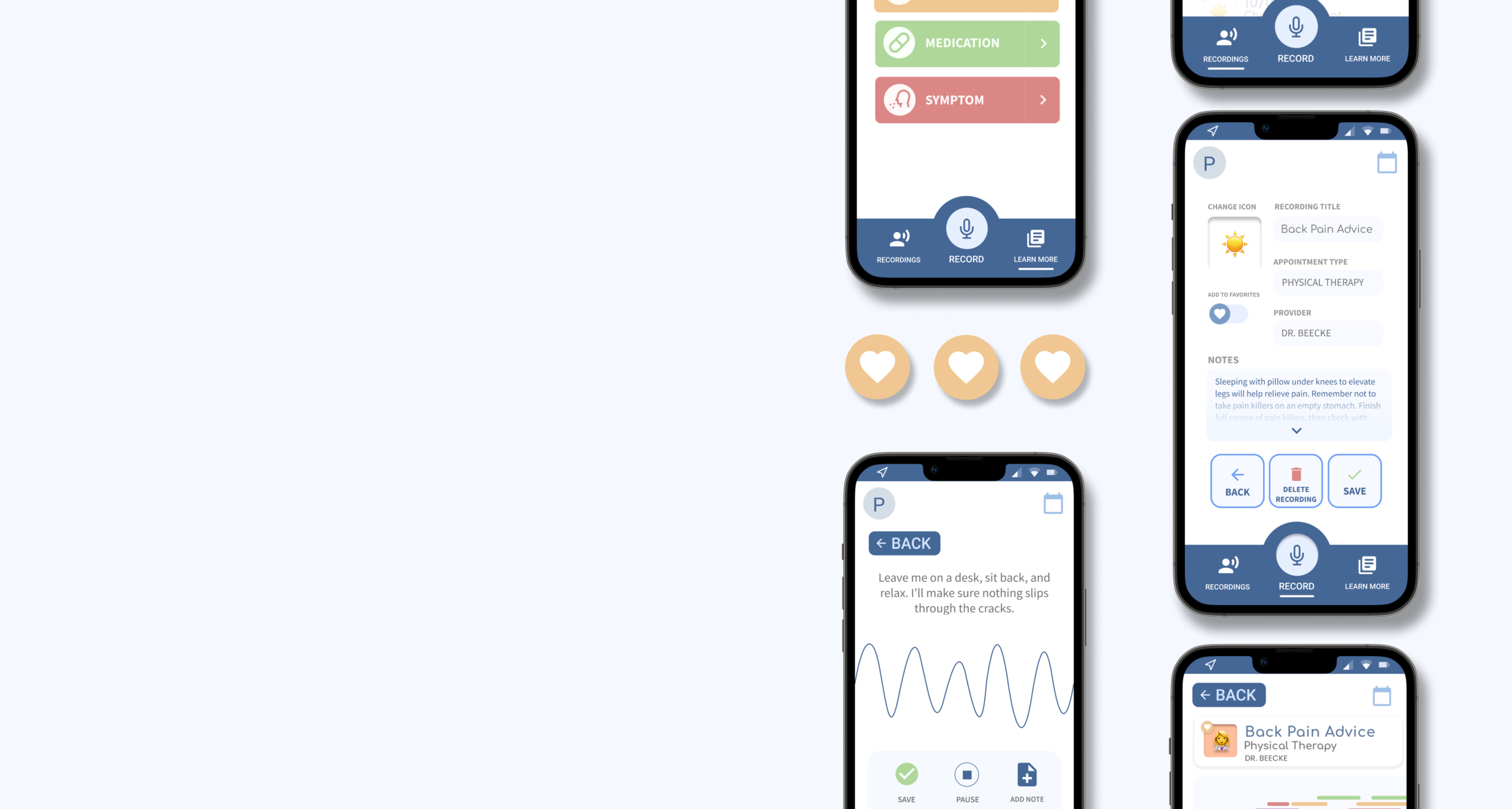
HealthPAL mobile champions simplicity, intuition, and patient engagement. Our design offers patients a source of support and encouragement that fits their personal treatment needs.
Record Appointments.
Gone are the days of forgetting “exactly what the doctor said.” HealthPAL enables users to audio record all medical appointments included in their treatment plan.
Users can add notes, icons, and labels to their recordings for easy navigation in their Recording Library.
Explore Appointment Topics.
HealthPAL automatically identifies predetermined medical topics in each appointment recording.
Users can see multiple views of what topics were mentioned when in our expanded Recording View, as well as further explore specific topics with our Learn More feature.
Secure Recording Storage and Sharing.
Users can share their recordings with friends, family, and healthcare professionals at ease.

Reclaiming Recovery.
check out my process

PROCESS
RESEARCH
Background
Treatment plans are only effective if patients can manage and understand them. How might HealthPAL reframe complex treatment plans for cancer patients who struggle with depression?
Our research emphasized analyzing User Testing from existing users who use the desktop and/or web app versions of HealthPAL.
RESEARCH
Competitive Analysis
We looked at 10+ existing digital solutions that offer functionalities which align with HealthPAL’s purpose. We took a deep dive into the user experience of each competitor and identified strengths and weaknesses that we could draw from.
DEFINE
Empathy Map
We organized and consolidated our research insights into a high-density Empathy Map in order to gain a deeper understanding of the challenges our target user might face.
Key Pain Points

The longer the treatment plan, the longer the list of recordings.
“Everything starts to look the same.”
After hundreds of appointments, patients struggle more and more to differentiate between their different appointments. Despite being able to see an appointment's date, the medical provider name, and even time of appointment, appointments inevitably blend together. 
Patients sometimes feel too awkward or uncomfortable to ask for recording permission, forgoing recording an appointment entirely.
“Is it weird if I just take out my phone and start recording?”
Explaining what HealthPAL is and why it's important can feel burdensome and intimidating to patients. As a result, some patients feel the need to secretly record their appointments, or give up the chance to record an appointment altogether. 
Users struggle to develop actionable steps from their complicated treatment plans.
“Now what?”
Being able to remember and better understand topics mentioned in an appointment can be helpful, but what happens next? Knowledge is only powerful if we are able to do something with what we've learned—a sense of follow-through that HealthPAL lacks. DEFINE
User Persona
Once we gained a better understand of key patient pain points, we created a trait-based
User Persona in order to ensure our solution prioritizes our target user.
DEFINE
Needs
We used a blend of Affinity Mapping and ‘How Might We’ questions in order to best understand the core of our users’ needs. We then formulated a POV Statement to clarify our overarching design goal.
DEFINE
POV Statement
Cancer patients who struggle with depression need an intuitive way to manage and take charge of their treatment plans.
IDEATE
Goals
Intuitive and Friendly
How might we incorporate a balance between a personalized friend and a professional tool in HealthPAL?
Engaging and Curiosity-Provoking
How might we create a product that encourages patients to be thoughtful and proactive about their treatment plans?
IDEATE
Low Fidelity Wireframes
We first brainstormed 15+ ideas utilizing the design thinking Crazy 8’s method. We then consolidated our findings into an initial User Flow.
In order to transform our idea into something testable, we created over a dozen iterations of Wireframe Sketches, Low Fidelity Wireframes, and eventually High Fidelity Screens.
IDEATE
Key Iterative Components
Our iterative designs considered several functions, including (1) individual recording visualization as well as (2) the animation for our recording tool. We conducted three rounds of User Testing in order to identify which iterations aligned best with our design goals.
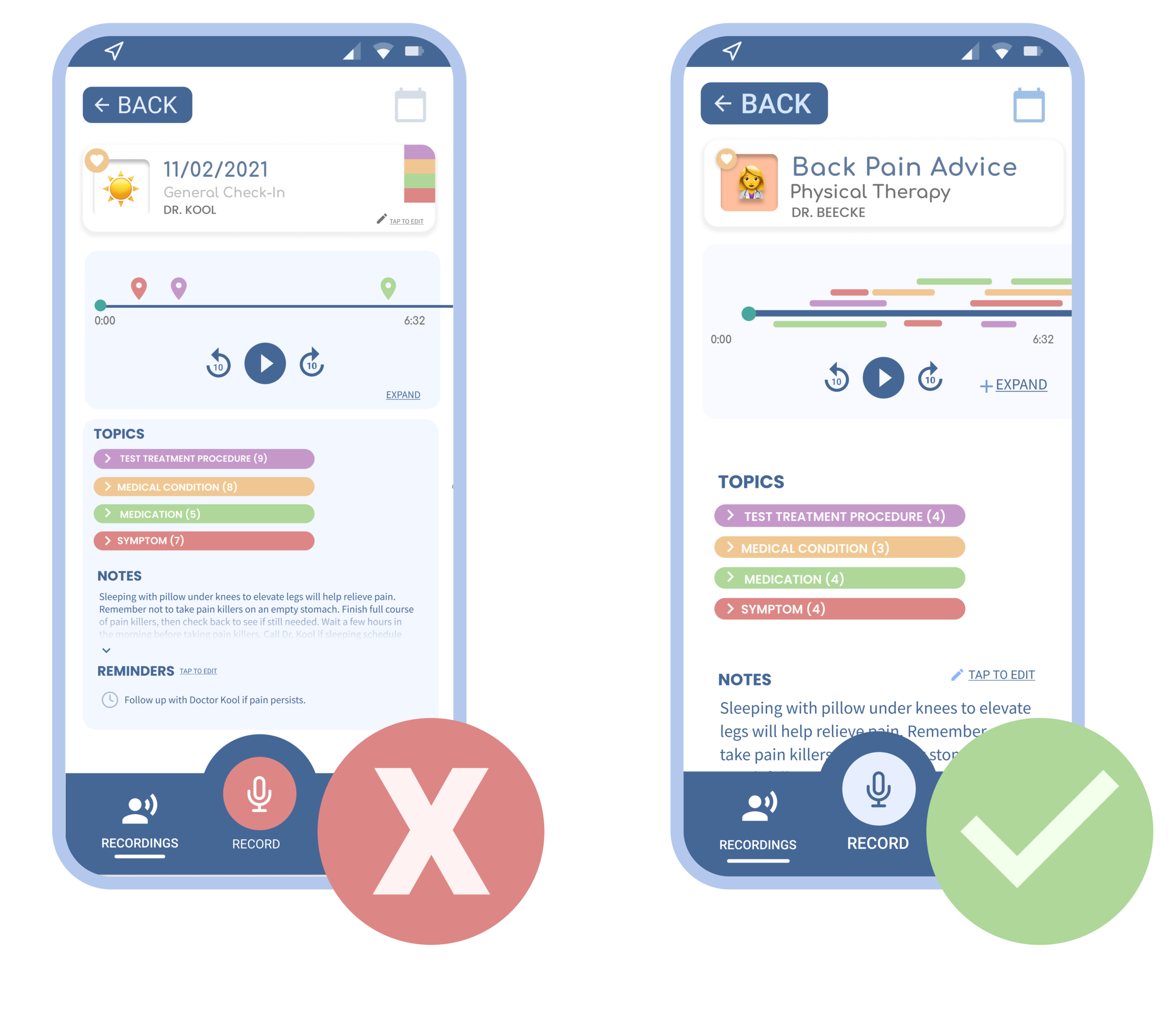
Recording visualization.
With an average of more than 10 different topics mentioned in each appointment, patients need a way to visualize which topics were mentioned, how many topics were mentioned, and when the topics were mentioned. We initially used markers to help users see an overview of all topics over a given appointment. However, though user testing we discovered that a layered highlight approach was more intuitive and helpful for our users.
Recording tool animation.
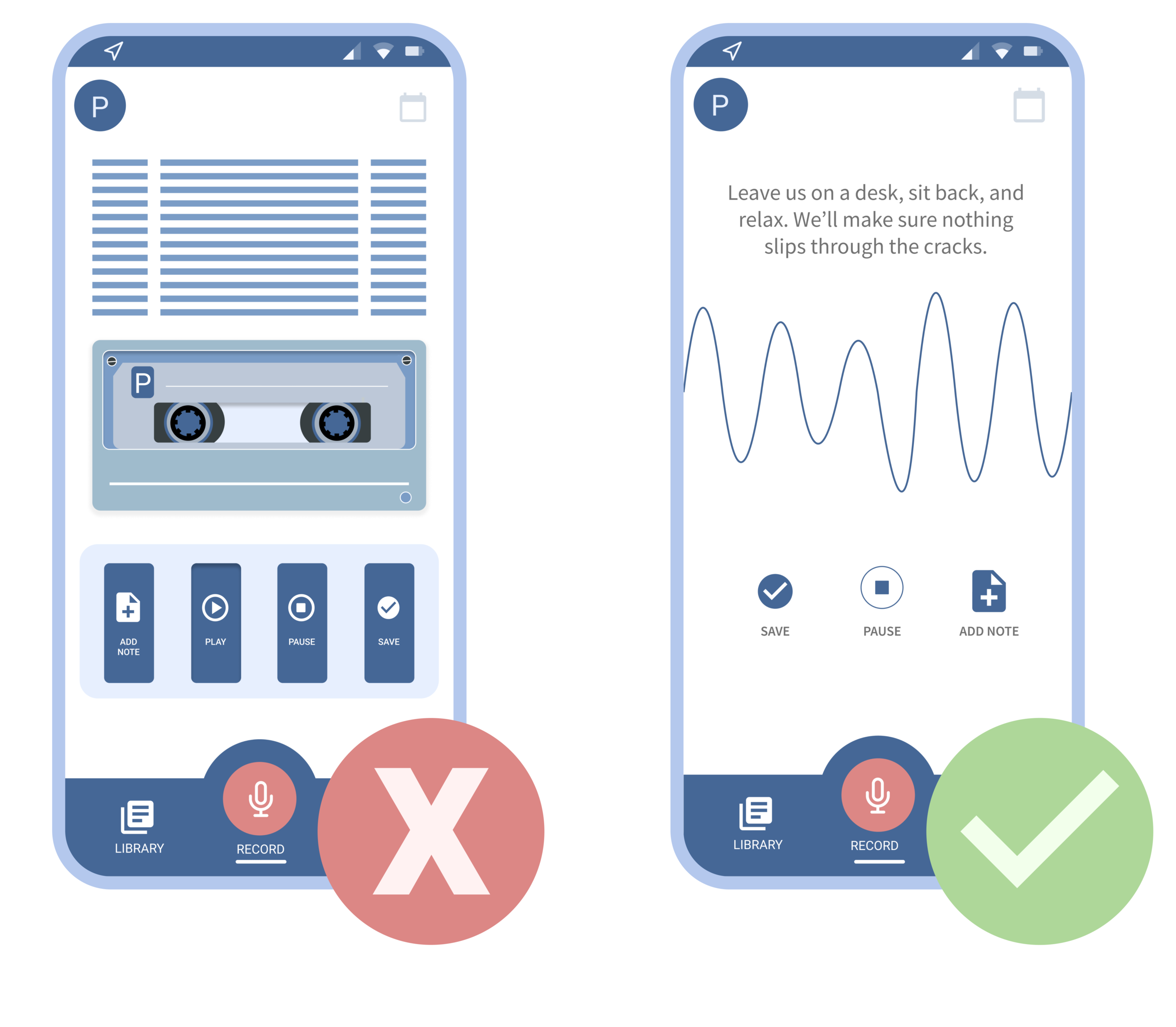
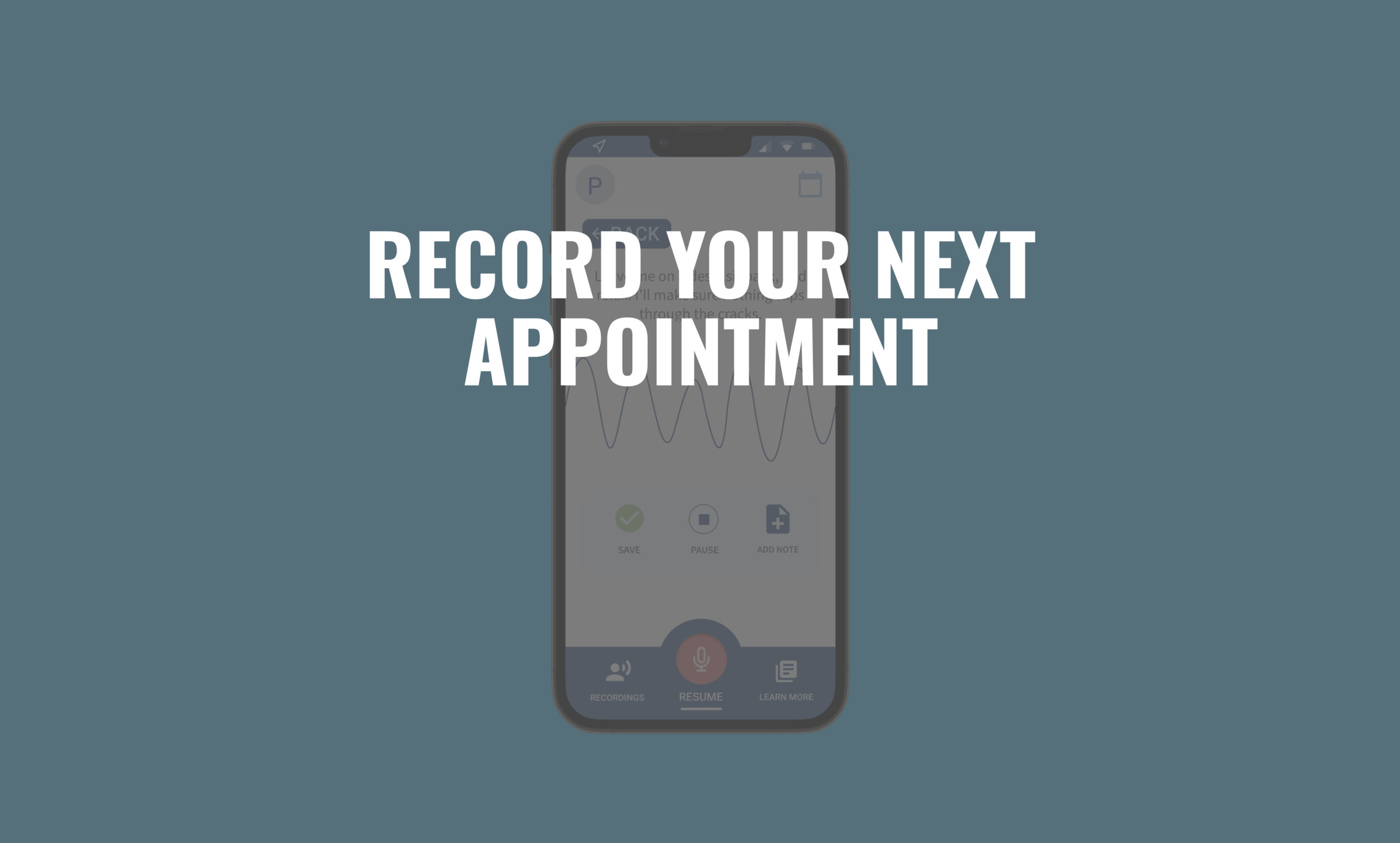
We wanted to make sure that HealthPAL’s recording feature was satisfying and joyful to use. We experimented with two different audio recording animations: one including a lighthearted tape recording, and another simple sound wave. Through user testing, we discovered that the sound wave was more relaxing and less distracting than the tape recorder.
PROTOTYPE & TEST
Visual Design System.
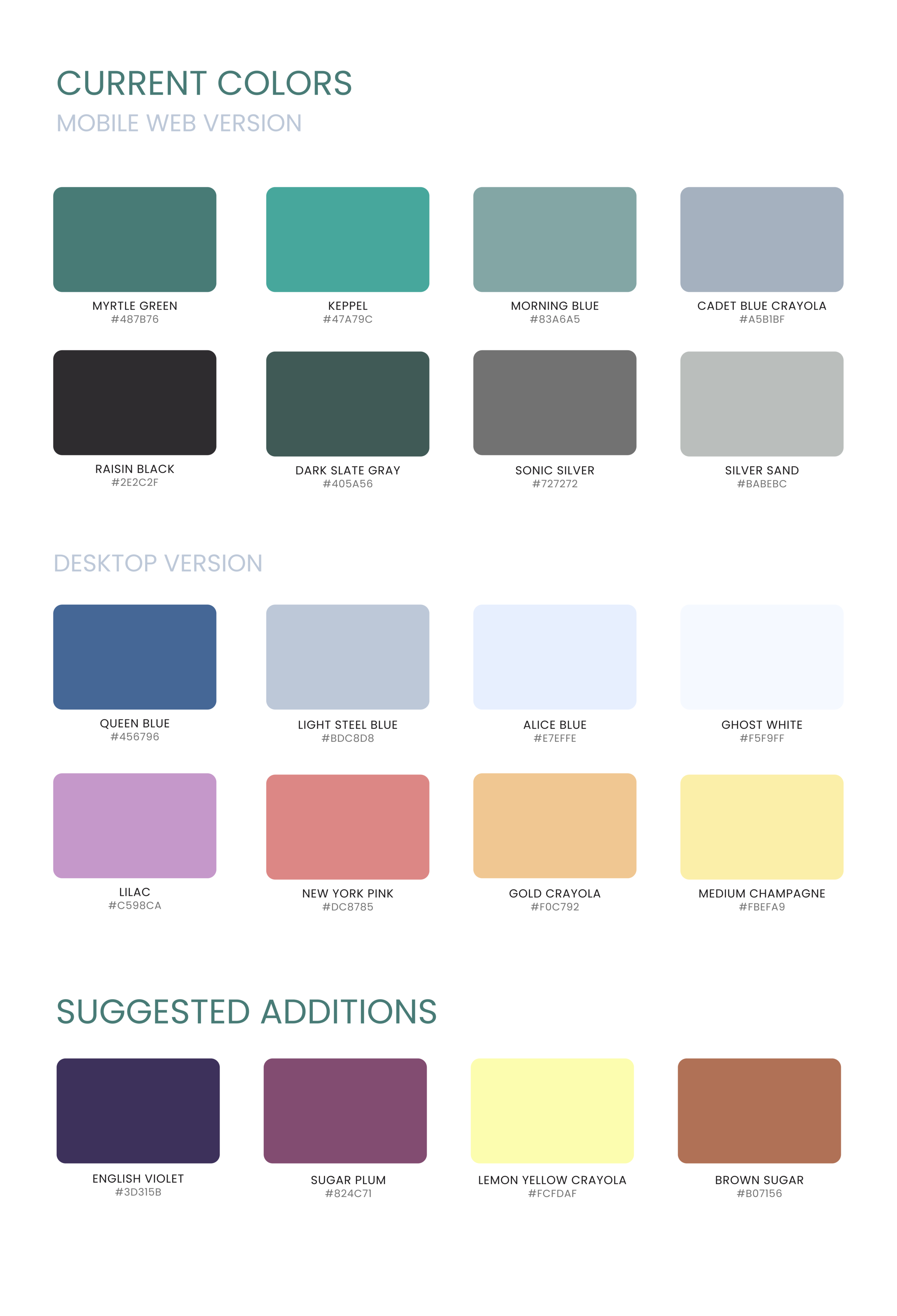
We integrated a combination of HealthPAL’s preexisting color palettes in order to craft a brighter, more friendly look and and feel.
Our blue base is designed to evoke a sense of a calm, while our pops of color add an element of liveliness.
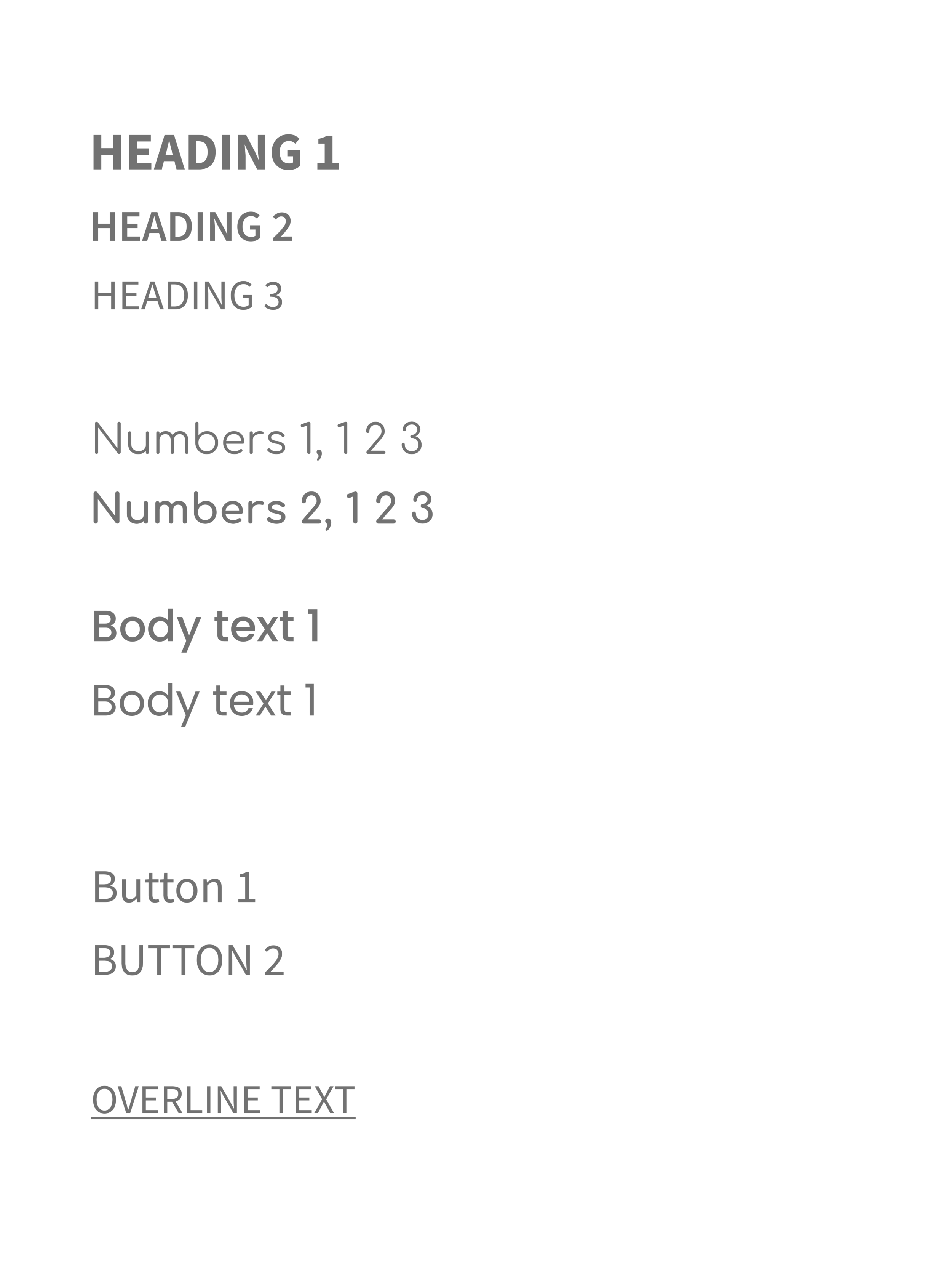
Our typography is comprised of a balance of Poppins, Source Sans Pro, and Comfortaa in order to achieve a professional, yet playful digital experience.
PROTOTYPE & TEST
High Fidelity Prototype.
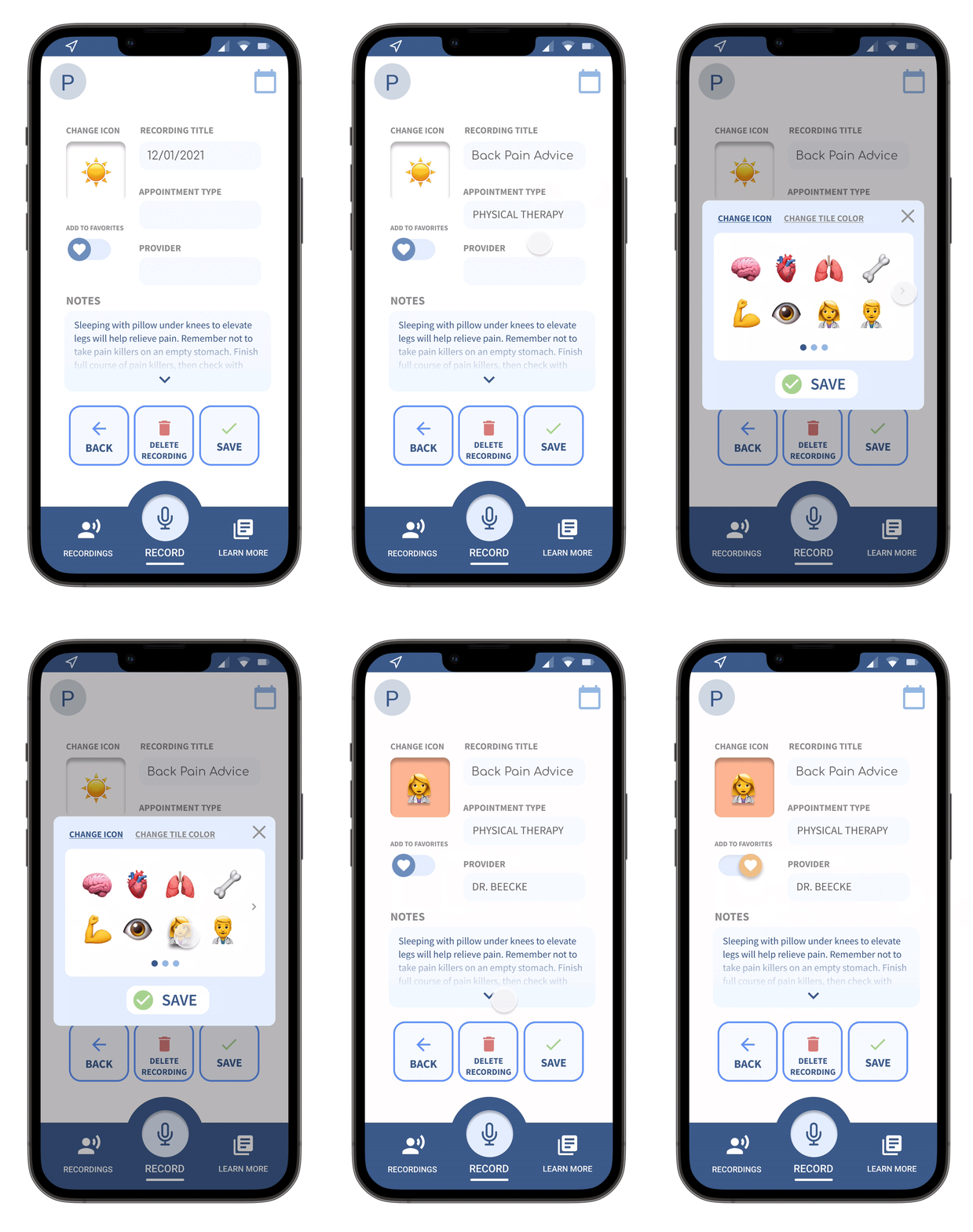
Customizable Recording Labels.
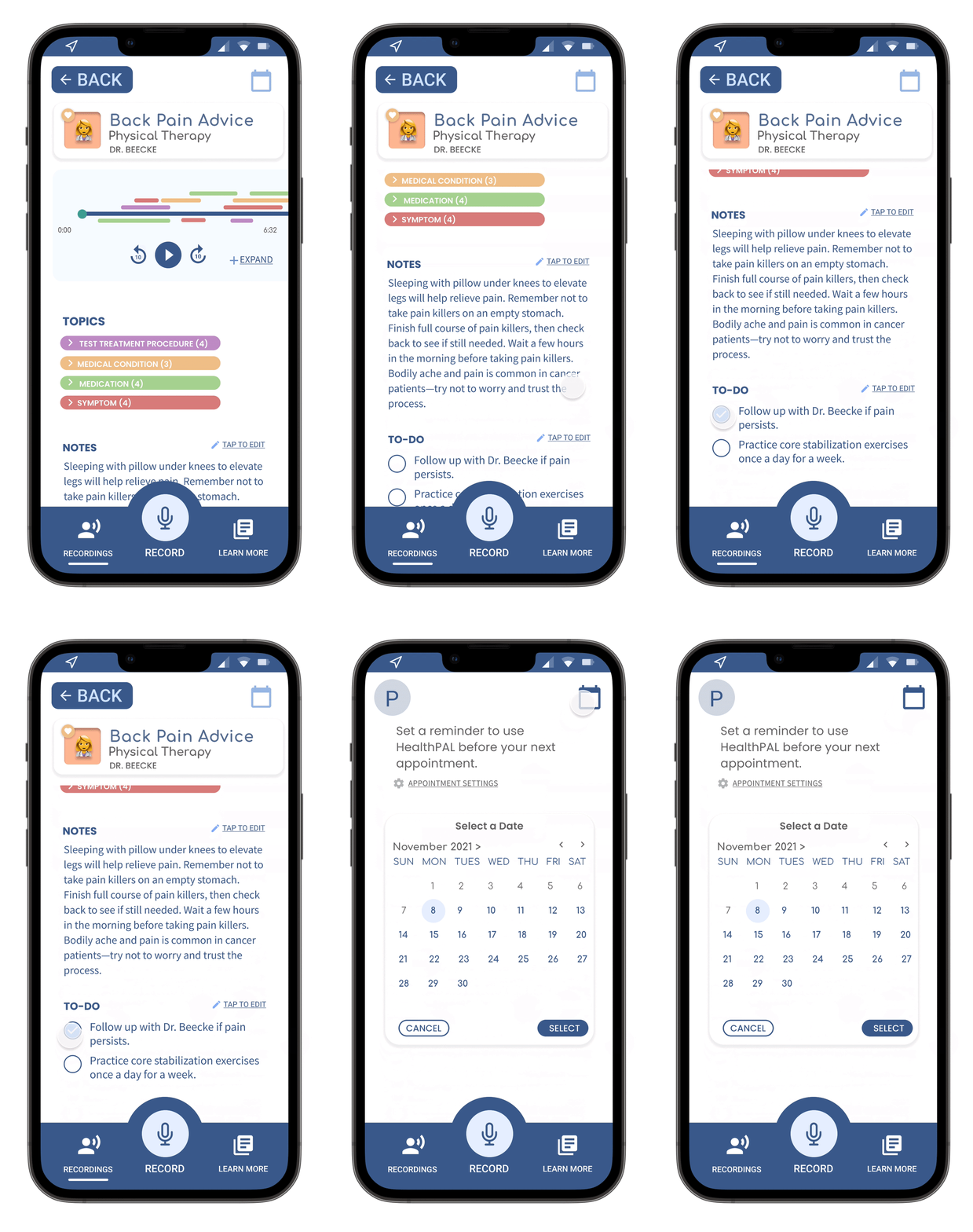
Patients can distinguish between different recordings with the options of selecting a recording icon, a tile background color, as well as customizing an appointment’s label, healthcare provider, and appointment type. Additionally, patients can ‘favorite’ any recording for quick access in the My Favorites page.
Appointment Reminders
and To-Do’s.
Patients can ask HealthPAL to send them a friendly appointment reminder prior to each medical appointment to make sure they never forget to hit record. Moreover, patients can also set reminders to ask their healthcare provider about a certain topic, as well as set personalized To-Do’s that correspond with specific appointments.
Recording Permission Helper.
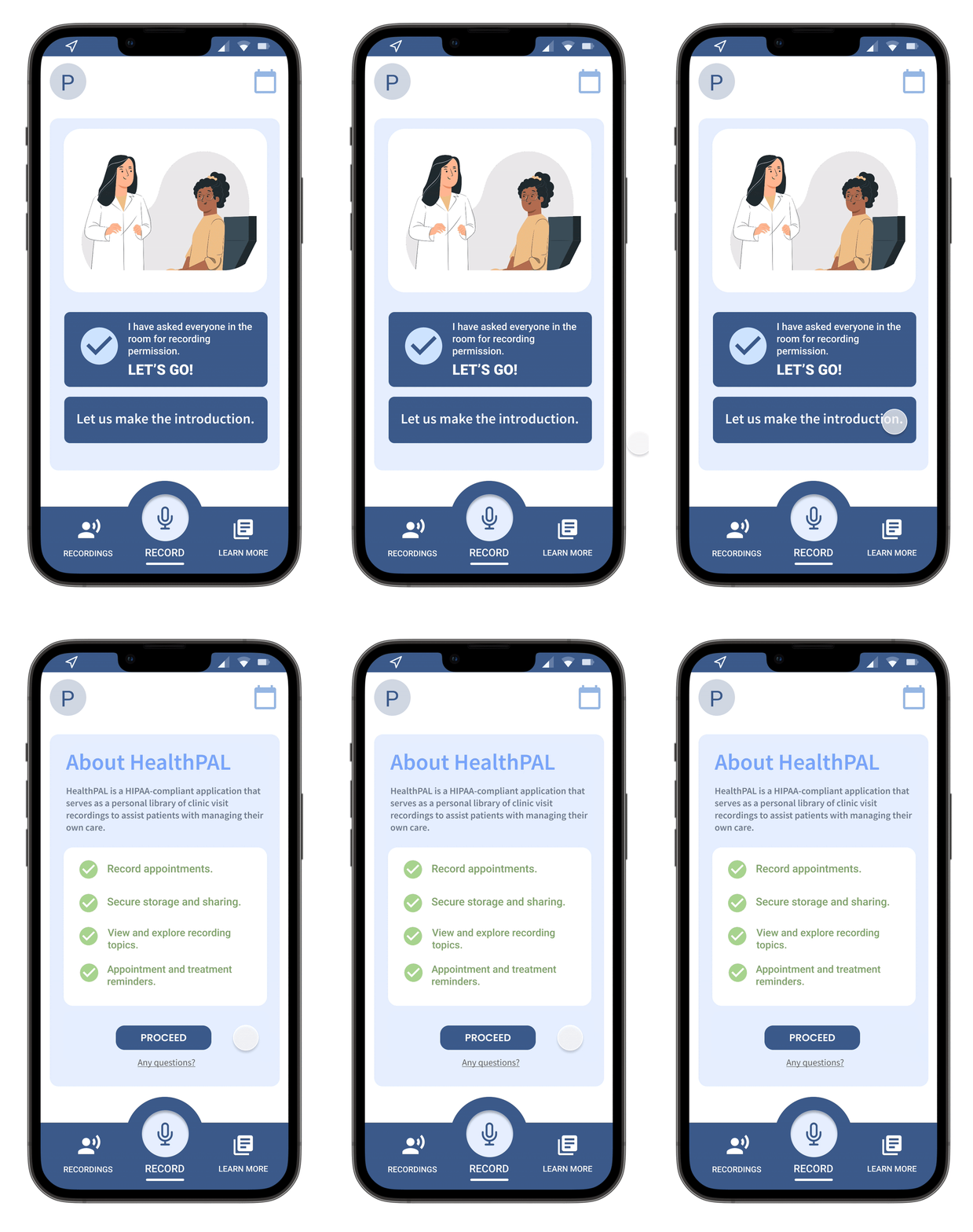
If a patient feels uneasy asking their healthcare professional for recording permission, they have the option to let HealthPAL do the talking. Our Recording Permission screen provides the patient with a handy 7-second summary of what HealthPAL is and why it’s important for quick consumption.
REFLECT
NEXT STEPS
HealthPAL mobile is an ever-evolving product with exciting potential to grow into a more powerful tool for our users. Looking forward, we have identified four main areas for future investigation and implementation.
SMART SEARCH.
Is a topic filter still effective if an appointment topic has been mentioned thousands of times? In order to refine our Filter function, we would like to incorporate a Search feature into our filter to enable a user to find a recording by date and time.
MY AGENDA.
Being able to set to-do’s is a powerful tool for generating patient engagement—now, how might we expand on this? We would like to experiment with including a fleshed-out My Agenda feature where patients can (1) view all to-do’s in one place and (2) set reminders for specific to-do’s.
HIGH-LEVEL ANALYTICS.
How can we enable patients to gain a broader understanding of their HealthPAL activity throughout a course of time? A high-level analytics page that uses a patient’s existing HealthPAL information can give a patient a clearer view of their overall treatment plan throughout long durations of time.
FRIENDLY FEEDBACK.
Nothing about battling cancer and poor mental health is easy. How can we continue to make HealthPAL mobile a non-clinical, friendly space? We would love to incorporate more copy in order to help users feel that HealthPAL truly is a friend in their back pocket.
Thanks for reading! Still curious?

